Configuring Microsoft Entra ID to meet Salesforce's 2026 phishing-resistant MFA requirement

Article    July 31, 2026
Meet the
Author:
SHARE
Meet the
Author:
SHARE
BOTTOM LINE UPFRONT

Salesforce now requires phishing-resistant MFA for all privileged users, even over SSO, and production enforcement is rolling out now through September 3. Entra ID users are seeing a confusing secondary prompt because password-plus-push doesn’t clear the new bar. Fix: enforce phishing-resistant authentication in Entra Conditional Access for privileged users, and the prompt goes away.

Beginning in 2026, Salesforce enforces two authentication requirements at once: multi-factor authentication on every login for all users, and phishing-resistant MFA for privileged users such as System Administrators, across direct and SSO logins, production and sandbox alike. For organizations that federate Salesforce through an identity provider like Microsoft Entra ID, the surprise shows up in a specific place: privileged users who already complete MFA at Entra still get challenged again inside Salesforce. Salesforce inspects the authentication signals carried inside the SSO token itself, and when those signals fail to prove a phishing-resistant method was used, it issues its own “secondary MFA” prompt, the experience organizations are reporting now.

The fix lives at the identity provider. Enforcing phishing-resistant authentication at Microsoft Entra ID for privileged Salesforce users gets an accepted Authentication Methods Reference (AMR) or Authentication Context Class Reference (ACR) value into the token, and once that signal is present, the secondary challenge stops. This paper walks through the change, how Salesforce evaluates the signal, who it applies to, and a phased path to implementation.

Why Salesforce is raising the bar

Salesforce has contractually required MFA since February 2022, but enforcement was historically uneven, and the threat landscape moved. Credential theft has become cheap and scalable, and attacker-in-the-middle (AiTM) phishing kits now proxy an entire login session in real time: the victim enters a password and a one-time code on a convincing but fraudulent page, the kit relays both to the legitimate service within seconds, and the attacker captures a fully authenticated session. Push-based approvals fail differently but just as reliably: “MFA fatigue” campaigns flood a user with approval prompts until one is accepted simply to stop the noise.

Both attack classes defeat what the industry now calls standard MFA: time-based one-time passcodes (TOTP), SMS and email codes, and push notifications. Methods built on the FIDO2/WebAuthn and certificate-based standards are immune, because they cryptographically bind the authentication ceremony to the genuine domain: a passkey will not release a credential to a look-alike site, and there is no code to intercept or prompt to mis-approve. Salesforce’s 2026 enforcement program applies this stronger standard where compromise is most damaging, accounts that can read or modify all data, change org configuration, or deploy code.

What is changing in 2026

Two related but distinct requirements take effect, on the timeline shown below.

  • MFA for all users, with no opt-out. Salesforce now enforces MFA at every login for every internal user: direct UI logins and SSO logins alike, in production and sandbox orgs. The org-wide disable option is retired, and the “Waive Multi-Factor Authentication for Exempt Users” permission no longer exempts anyone automatically; legitimate exemptions (for example, automated testing accounts) must be approved by Salesforce Support.
  • Phishing-resistant MFA for privileged users. Users with administrative or broad-access permissions must authenticate with a phishing-resistant method: a passkey or built-in authenticator (Windows Hello, Touch ID, Face ID), a WebAuthn/FIDO2 hardware security key, or certificate-based authentication. Standard methods (TOTP apps, SMS and email codes, and push approvals, including Salesforce Authenticator) no longer satisfy the requirement for this population.
  • Enforcement is staggered, not instantaneous. Sandbox enforcement began June 22, 2026; production enforcement began July 20, 2026, and proceeds in waves by release group through September 3, 2026. Two orgs on different instances can therefore see enforcement on different days. Once an org’s wave arrives, non-compliant privileged users are blocked at login until they register a compliant method.
  • Accompanying login changes. Salesforce is also moving to a two-step login flow (username first) and encourages password-less login with passkeys, which satisfies the requirement in a single gesture.

Figure 1. Salesforce 2026 authentication enforcement timeline.


TierApplies toAccepted methods
Standard MFAAll internal usersTOTP authenticator apps, Salesforce Authenticator push, security keys, built-in authenticators; or an SSO login carrying any accepted MFA signal
Phishing-resistant MFAPrivileged users (see next section)Passkeys / built-in authenticators (Windows Hello, Touch ID), WebAuthn/FIDO2 security keys, certificate-based authentication; or an SSO login carrying a phishing-resistant signal

Who must meet the phishing-resistant requirement

Salesforce defines the privileged population functionally rather than by job title. A user is in scope if any of the following applies, whether granted through a profile, a permission set, or a permission set group:

  • The System Administrator profile.
  • The Modify All Data permission.
  • The View All Data permission.
  • The Customize Application permission.
  • The Author Apex permission.

Because these permissions are frequently distributed through permission sets (to integration owners, release managers, and report builders), the in-scope population is usually larger than the list of people the organization calls “admins.” An accurate inventory is the first implementation step, and an opportunity to apply least privilege: every elevated permission removed shrinks the population subject to the stricter requirement.

Out of scope: Experience Cloud (external community) users, and non-interactive API integrations using the JWT Bearer or Client Credentials OAuth flows. Interactive OAuth flows that present the Salesforce login UI (Web Server and Hybrid token flows) are subject to enforcement, which matters for third-party tools and managed-service providers that sign in as privileged users.

How Salesforce evaluates SSO authentication signals

For federated logins, Salesforce never observes the authentication ceremony at the IdP; it inspects two industry-standard claims carried in the SAML assertion or OpenID Connect (OIDC) ID token:

  • AMR, or Authentication Methods Reference (RFC 8176): the specific methods used during sign-in, such as pwd (password), otp (one-time password), hwk (proof-of-possession of a hardware key), or fido2.
  • ACR, or Authentication Context Class Reference: the overall assurance level of the authentication context.

Salesforce classifies the values it receives into tiers. Phishing-resistant values include fido, fido2, hwk, swk, wia, x509, cert, and smartcard; standard-MFA values include mfa, otp, and similar; anything else, or an empty claim, fails both checks. Any phishing-resistant value also satisfies the standard-MFA requirement, so a correctly configured IdP covers both tiers with one signal. Two evaluation details frequently cause surprises:

  • Parsing rules differ by protocol. For SAML, Salesforce parses any attribute whose name contains amr or authn methods references; values must be semicolon-separated, and URN/URL values are split on “:” and “/” so urn:custom:auth:hwk resolves to hwk. For OIDC, the amr claim must be an array, matched exactly and case-sensitively. ACR values are lower-cased and matched with a contains() comparison.
  • The accepted list evolves. In July 2026, Salesforce removed the generic multipleauthn value because Entra ID now emits granular per-method signals; organizations relying on it saw privileged users challenged mid-month with no change on their side.

The current value lists and parsing rules are maintained in the Salesforce Help article referenced at the end of this paper; treat it as the source of truth when configuring an IdP.

Why Entra SSO MFA can still trigger a secondary verification

The secondary prompt is not a malfunction; it is Salesforce’s fallback when the SSO token does not prove a phishing-resistant login for a privileged user (see figure below). The typical failing pattern is an Entra sign-in using password plus Microsoft Authenticator push or a TOTP code: genuine MFA, but standard MFA. The AMR claim reports values such as pwd and mfa, Salesforce classifies the login below the phishing-resistant tier, and the user must register and use a Salesforce-side passkey before the session is granted.
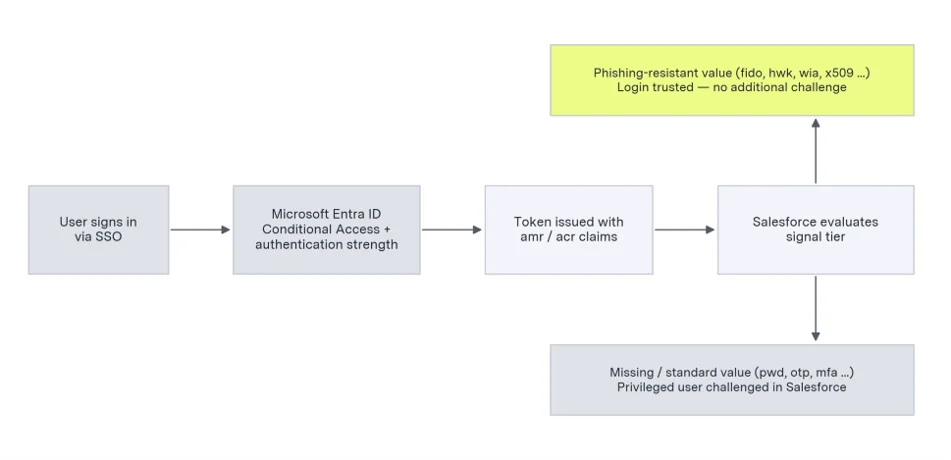
Figure 2. Evaluation of an SSO login against the phishing-resistant requirement.

Three configuration states produce the secondary challenge:

  • The claims are absent. Before June 29, 2026, Entra ID did not consistently include AMR/ACR claims in SAML assertions. Entra now includes both automatically for SAML 2.0 and OIDC applications on the v2.0 endpoint; custom OIDC integrations still on v1.0 should be migrated.
  • The claims show standard MFA. The user authenticated with password plus push or OTP, so the granular signal Entra now sends is truthful, and insufficient for the privileged tier.
  • The claims show an unrecognized value. The authentication was genuinely phishing-resistant, but the transmitted value does not appear on Salesforce’s accepted list. Verifying the actual values received (see Validation and troubleshooting) resolves this class quickly.

The fix, therefore, is to make the Entra sign-in itself phishing-resistant for the privileged population, at which point the claim value changes and the challenge stops.

Target state: phishing-resistant authentication at Microsoft Entra ID

The recommended architecture keeps Microsoft Entra ID as the single authentication authority and satisfies Salesforce’s requirement at the point of federation. Four elements make up the target state:

  • Credential enrollment. Privileged users register at least one phishing-resistant credential in Entra: a device-bound passkey, Windows Hello for Business, a FIDO2 security key, or a certificate. Registering two methods per user provides recovery headroom.
  • Conditional Access enforcement. A Conditional Access policy scoped to the Salesforce enterprise application and an Entra security group containing the privileged users requires the built-in “Phishing-resistant MFA” authentication strength. The policy guarantees that these users cannot reach Salesforce with a weaker factor, and therefore that the token always carries an accepted value such as fido2, hwk, wia, or x509.
  • Claim transmission. With the June 29, 2026 platform update, Entra automatically forwards granular AMR/ACR claims for SAML and OIDC tokens (including signals from an external MFA provider where one is configured), so no manual claim mapping is required for the standard Salesforce gallery application.
  • Salesforce-side fallback. In Setup → Identity Verification, enable security keys and built-in authenticators, and have each administrator register a backup passkey directly in Salesforce, preserving break-glass access during an IdP outage and covering login paths that bypass SSO.

Non-privileged users require no change: their existing Entra MFA already meets the standard tier, and the same automatic claims now prove it to Salesforce.

Integration and test automation accounts

Enforcement is keyed to the login flow, not the account type. Integrations authenticating with the JWT Bearer or Client Credentials OAuth flows never present the Salesforce login UI, so MFA enforcement does not apply; this is the target state for machine-to-machine connections. By contrast, OAuth Web Server and Hybrid Token flows require an interactive login to establish tokens, and if that account is privileged, the login is now subject to phishing-resistant MFA. Three operational nuances deserve attention:

  • Delayed failures via refresh tokens. An existing Web Server flow integration continues to operate on its refresh token until that token expires or is revoked; only the next re-authentication hits the new requirement. Interactive-flow integrations can therefore fail weeks after enforcement rather than on day one, so re-authentication must be exercised deliberately during sandbox validation.
  • Shared accounts break. Phishing-resistant credentials are bound to a device or a passkey vault and cannot be circulated like a password. A shared “integration admin” login used by several people fails under this model; the interim remedy is a passkey held in a team-managed enterprise vault, and the target remedy is splitting the shared identity into individual accounts and a dedicated machine identity.
  • Test automation. UI test suites and release-automation robots that sign in as privileged users are blocked once their org’s wave arrives. Options, in order of preference: run tests under least-privileged accounts scoped to the objects under test; bootstrap sessions through JWT Bearer where the tool supports it; or request an MFA exemption through Salesforce Support for the residual accounts; the “Waive Multi-Factor Authentication for Exempt Users” permission no longer applies automatically. Automated tests must also be updated for the new two-step login flow, which presents the username field before the password field.

The working pattern is inventory-and-migrate: list every integration login, identify its OAuth flow from the Connected App configuration and Login History, migrate interactive-flow integrations to JWT Bearer or Client Credentials where the vendor supports it, reduce each integration identity to a purpose-built permission set, and reserve exemptions for the few cases that genuinely require an interactive login, cleanly separating human administrative access from certificate-bearing machine identities.

Implementation roadmap

A four-phase approach fits most organizations and can typically be completed well within an enforcement wave.

Phase 1: Discover

  • Inventory the privileged population: report on the System Administrator profile and the four privileged permissions across profiles, permission sets, and permission set groups.
  • Rationalize access: remove elevated permissions that are not required; separate human admin accounts from integration identities (see previous section).
  • Baseline the current signal: sample recent privileged SSO logins in Login History (Authentication Method Reference column) to see exactly which AMR values Salesforce is receiving today.

Phase 2: Configure

  • Create the privileged-user security group in Entra and drive enrollment of phishing-resistant credentials, tracking completion per user.
  • Deploy the Conditional Access policy in report-only mode first, confirm no unintended lockouts, then enforce.
  • Enable security keys and built-in authenticators in Salesforce Identity Verification, and register Salesforce-side backup passkeys for administrators.

Phase 3: Validate in sandbox

  • Sandboxes enforce ahead of production and are the natural proving ground: have pilot privileged users sign in via SSO and confirm the login is trusted without a secondary challenge.
  • Inspect the raw assertion or ID token for at least one pilot login (via a SAML tracing tool or Login History for OIDC) and confirm the AMR value matches the accepted list.

Phase 4: Roll out and operate

  • Enforce the policy for the full privileged group before the org’s production date, communicate the new sign-in experience, and staff the service desk for enrollment questions.
  • Establish recovery procedures: a second administrator can issue a temporary verification code and reset methods for a locked-out colleague; document this path before it is needed.
  • Add a periodic control: review the privileged inventory and spot-check AMR values quarterly, monitoring release notes for changes to the accepted lists.

Validation and troubleshooting

Salesforce provides two inspection points. Login History (Setup → Users → Login History) can display the Authentication Method Reference column, showing AMR values received per SSO login; for SAML, a browser tracing extension shows the full assertion, including AuthnContextClassRef and any authnmethodsreferences attribute. The table below maps common rollout symptoms.

SymptomLikely causeResolution
Privileged user prompted to enroll in Salesforce MFA after SSOToken carries only standard values (pwd, mfa, otp) or no AMR claimEnforce phishing-resistant authentication strength in Conditional Access for the user; confirm v2.0 endpoint for custom OIDC
Prompt began mid-July 2026 with no configuration changeReliance on the retired multipleauthn valueMove to granular signals by requiring a phishing-resistant method at Entra
User authenticated with a passkey but is still challengedTransmitted value not on the accepted list, or method registered as standardInspect the raw assertion; re-register the credential as a passkey/security key; verify against the current Salesforce value list
Privileged user fully locked outNo compliant method registered at enforcementAnother admin issues a temporary verification code and resets methods; register a compliant credential
Automation or test account blocked at loginInteractive OAuth flow now subjects to MFAMove to JWT Bearer / Client Credentials, or request an exemption via Salesforce Support

The secondary verification is Salesforce reading a token that hasn’t yet proven what it claims: a login clean enough to trust with data, configuration, and code. Fixing that starts and ends at Entra. Once Conditional Access requires a phishing-resistant credential for the privileged population, the token carries the signal Salesforce is looking for, and the duplicate prompt disappears on its own.

The security upgrade underneath the compliance deadline is the real payoff. AiTM phishing kits and MFA fatigue campaigns are built to beat passwords, codes, and push approvals, the exact methods this requirement retires for admins. A passkey or hardware key clears Salesforce’s check and closes the door those attacks walk through.

Organizations that treat this rollout as an opportunity to harden their most sensitive accounts, rather than a box to check before September 3, will be the ones still standing when the next credential-theft campaign runs.

FAQ

Why does Salesforce prompt for MFA again after I've already signed in through Microsoft Entra ID SSO?

Salesforce issues a secondary MFA prompt when the SSO token doesn’t prove a phishing-resistant login for a privileged user. Salesforce never sees the authentication ceremony at the identity provider — it reads the AMR (Authentication Methods Reference) and ACR claims carried in the SAML assertion or OIDC ID token. A password-plus-Microsoft-Authenticator-push sign-in returns values like pwd and mfa, which are genuine MFA but classify below the phishing-resistant tier. The prompt is Salesforce’s fallback, not a malfunction. Note that Salesforce retired the generic multipleauthn value in July 2026, which caused some orgs to see prompts appear mid-month with no configuration change on their side.

How do I configure Microsoft Entra ID to satisfy Salesforce's phishing-resistant MFA requirement?

Enforce the built-in “Phishing-resistant MFA” authentication strength in an Entra Conditional Access policy scoped to the Salesforce enterprise application and a security group containing your privileged users. Four elements complete the target state:

  1. Credential enrollment — privileged users register a device-bound passkey, Windows Hello for Business, a FIDO2 security key, or a certificate (two methods per user provides recovery headroom).
  2. Conditional Access enforcement — deploy in report-only mode first to confirm no unintended lockouts, then enforce.
  3. Claim transmission — as of the June 29, 2026 platform update, Entra automatically forwards granular AMR/ACR claims for SAML and OIDC tokens on the v2.0 endpoint; custom OIDC integrations still on v1.0 should be migrated.
  4. Salesforce-side fallback — enable security keys and built-in authenticators under Setup → Identity Verification and register a backup passkey per administrator for break-glass access.

Once Conditional Access requires a phishing-resistant credential, the token carries an accepted value (fido2, hwk, wia, x509) and the duplicate prompt stops on its own. Non-privileged users require no change.

Who counts as a privileged user under Salesforce's 2026 phishing-resistant MFA requirement?

Salesforce defines the privileged population functionally, not by job title. A user is in scope if they hold the System Administrator profile or any of four permissions — Modify All Data, View All Data, Customize Application, or Author Apex — whether granted through a profile, permission set, or permission set group. Because these permissions are commonly distributed to integration owners, release managers, and report builders, the in-scope population is usually larger than the list of people an organization calls “admins.” An accurate inventory is the first implementation step and a natural least-privilege opportunity: every elevated permission removed shrinks the population subject to the stricter standard. Out of scope: Experience Cloud external community users and non-interactive API integrations using JWT Bearer or Client Credentials OAuth flows.

Do Salesforce API integrations and test automation accounts need phishing-resistant MFA?

Enforcement is keyed to the login flow, not the account type. Integrations using JWT Bearer or Client Credentials OAuth flows never present the Salesforce login UI, so MFA enforcement doesn’t apply — this is the target state for machine-to-machine connections. Interactive flows (Web Server and Hybrid Token) do require a login and are in scope if the account is privileged. Three operational risks deserve attention:

  • Delayed failures. Existing Web Server integrations keep running on refresh tokens until those expire or are revoked, so failures can surface weeks after enforcement rather than on day one. Exercise re-authentication deliberately during sandbox validation.
  • Shared accounts break. Phishing-resistant credentials bind to a device or passkey vault and can’t be circulated like a password. Split shared “integration admin” logins into individual accounts plus a dedicated machine identity.
  • Test automation. UI test suites signing in as privileged users are blocked once the org’s wave arrives, and must also be updated for the new two-step login flow (username before password).

The working pattern is inventory-and-migrate: identify each integration’s OAuth flow from Connected App configuration and Login History, migrate interactive flows to JWT Bearer where the vendor supports it, and reserve Salesforce Support exemptions for the few accounts that genuinely require an interactive login. For PE-backed portfolio companies running lean IT functions, this separation of human administrative access from certificate-bearing machine identities is the durable win — Accordion typically treats it as part of broader access rationalization rather than a one-time compliance fix.

Talk to Accordion about your Salesforce MFA rollout.

Our contact form is currently blocked by your cookie preferences. Please change your preferences to continue.